
HSA FAQs
Answers to Frequently Asked Questions.
What is a health savings account (HSA)?
An HSA is a savings account that lets you set aside money on a pre-tax basis to pay for qualified medical expenses. Further, if you choose to invest any of your funds in the account, interest earnings and investments are tax-free. Employees and employers may both contribute funds to the account up to an annual limit, and the employee owns the account. To contribute to an HSA, you must be enrolled in a qualified high-deductible health plan (HDHP) and be HSA-eligible.
What is a high-deductible health plan (HDHP)?
A high-deductible health plan is a health insurance plan that meets various IRS requirements, including having a deductible that is greater than a defined IRS limit. The deductible must apply to both medical and prescription expenses. Monthly premiums for an HDHP are often lower than standard health plan. In HDHP plans, individuals take on more of the up-front costs of health care.
Am I eligible to participate in an HSA?
To contribute to an HSA, you must meet all the following requirements.
- Be enrolled in an HSA-qualified high deductible health plan (HDHP) that meets the minimum annual deductible and maximum out-of-pocket expense limit specified by the IRS each year. HDHP requirements can be found on our Plan Limits page
- Not be another individual’s tax dependent
- Not be enrolled in Medicare
- Not be covered by any disqualifying coverage
Disqualifying coverage refers to any benefit coverage that reimburses you for general medical expenses before a HDHP minimum deductible is met. A standard health FSA (through either yourself or your spouse) is considered disqualifying coverage, meaning that you cannot be enrolled in a standard health FSA and contribute to an HSA at the same time. Because of this, standard health FSAs with grace period or rollover can delay or prevent you from being HSA eligible during the period of time in which the grace period or rollover funds are available to you. To see if you have a standard health FSA with grace period or rollover, review your My Company Plan in your online account.
How do I pay for qualified medical expenses with my HSA?
You can pay for qualified medical expenses with your HSA by either using your Benefits Card or using online bill pay.
Benefits Card
Your Benefits Card is a prepaid debit card that lets you pay for eligible expenses directly from your HSA. Your card is mailed to you when you first enroll.
Simply use it at the register or make an online payment to activate it—no need to call. You can use your Benefits Card to pay for eligible expenses at a variety of retailers. Visit the Where to Shop page for more information.
Online Bill Pay
If you purchase a qualified medical expense without using your Benefits Card, you can pay yourself back for the eligible expense with online bill pay.
You can also use online bill pay to send a payment directly to a provider.
To access your online bill pay:
- Login to your online account at www.ebcflex.com.
- Select your HSA tile.
- Click on your HSA balance.
- Select HSA Bill Pay.
You are responsible for ensuring that your HSA funds are only spent on qualified medical expenses. You do not need to submit any receipts or documentation. However, is a good idea to save health care bills and documentation in case of an IRS audit. If you choose to withdraw HSA funds for non-qualified expenses, you will be subject to income tax plus a 20% penalty tax on the amount of the withdraw.
What can I use my HSA funds on?
You can use your HSA to pay for a wide range of eligible medical expenses:
- Health plan co-pays
- Prescriptions
- Deductible costs
- Co-insurance
- Vision care
- Dental care
- Certain medical supplies
- Over-the-counter medications
See specific guidance regarding eligible expenses in IRS Publication 502.
For more information on where you can spend your HSA funds, visit www.ebcflex.com/WheretoShop
How do I save money with an HSA?
With an HSA, you save approximately 30%* on your eligible expenses, making a $1,000 expense cost you about $700. You get these savings because the contributions you make to your HSA are exempt from Federal, State, and FICA payroll taxes.
While the money you contribute to your HSA is tax-free, any additional money that you earn from interest and/or investing is also considered tax-free as long as these funds are used for eligible medical expenses. This means that the money that you contribute, spend, and earn through interest and investing is all tax-free.
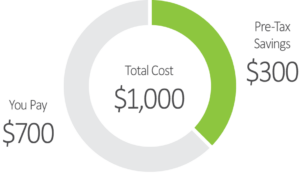
*This tax example is a broad approximation of tax liability. Further, your contributions may be subject to state income tax in some states. Your specific savings depend on your tax bracket. You should consult a tax advisor for help with your own situation. Current IRS tax laws control all pre-tax payment and contribution matters and are subject to change.
How do I contribute money to my HSA?
Your employer may provide pre-tax payroll deductions, which means that you can contribute a portion of your income, up to the maximum annual contribution limit, to your HSA. Your contribution is deducted before taxes, saving you money.
You may also contribute directly from your personal checking account. When contributing directly, you may wish to confirm with your employer that your contributions and any contributions they may provide do not exceed the maximum annual contribution limit. When contributing directly, you may also wish to deduct accordingly on your personal income tax return.
How much can I contribute to my HSA?
The IRS has a maximum annual contribution amount that is reviewed and updated every year. The maximum annual contribution amount refers to the maximum amount of HSA dollars that you and your employer combined can contribute to your HSA, assuming you are HSA-eligible for the full year. Individuals age 55 or over may contribute additional catch-up contributions.
Refer to our Plan Limits Page for the maximum annual contribution limit for HSAs.
If you are not HSA-eligible for the entire year in which you file taxes (generally calendar year), the most you can contribute to an HSA may be reduced. Please see Form 8889 Instructions for how to calculate your maximum allowable contribution.
Do I need to spend all my HSA funds by the end of the plan year?
No, you do not need to spend all your HSA funds by the end of your plan year. Any unused HSA funds remain in your account and continue earn interest year-over-year. Because of this, HSAs are a great way to save money and create a nest egg for the future. You can then use these saved funds to cover unexpected health care costs or save them for when you retire.
What interest options are available with my HSA?
At EBC, we have two interest options for your HSA—a traditional interest option or a high-yield interest option. When you first enroll in your HSA, your HSA cash balance will automatically start out with the traditional HSA interest option, but you can transition your HSA cash balance to a high-yield HSA option at any time.
The high-yield HSA gives you the opportunity to earn higher interest on your HSA funds by having your HSA held in a non-FDIC-insured account that is backed by a highly-rated insurance company, Pacific Life. With the high-yield feature, the road to financial wellness is more accessible for you should you choose to take advantage of enhanced interest rates and maximize the savings potential of your HSA.
Can I invest my HSA funds?
Yes, once your HSA reaches a minimum $1,000 cash balance, you can start investing your HSA funds. There are three investment models to choose from based on your experience—Managed, Self-Directed, and Brokerage. Whether you’re new to investing and are looking for a guided experience or are a seasoned investor looking to research and trade stocks and ETFs, you will have an investment model that best fits your needs. If your investment needs ever change, you can switch your investment model at any time.
You can also transfer funds between your HSA cash balance and investment balance at any time.
How can my HSA help with retirement planning?
Your HSA is employee-owned, which means that your HSA funds are yours to keep, and they roll over each year. Because of this, any unused funds in your HSA grow and become a great long-term savings vehicle for retirement. You can also maximize your savings even more by opting in to a high-yield interest rate and investing your HSA cash balance.
Your HSA is also a great tool for retirement because any funds that you spend on eligible medical expenses are tax-free.
Once you turn age 65, you can choose to use funds for non-qualified expenses. While you will still have to pay income tax on any non-qualified distributions, you would no longer be assessed a 20% excise tax for these account distributions.
How do I consolidate multiple HSAs?
If you have multiple HSAs, you can consolidate them so you only have to manage one account. To consolidate your HSAs, complete the HSA Transfer of Assets Form available in your online account.
- After you log in to your online account, select your HSA tile.
- Navigate to the menu and select Forms and Documents under Resources.
The HSA Transfer of Assets Form should be sent to your previous HSA custodian once it’s been completed.
Note: HSAs are individually owned. Even if you are married, these accounts cannot be a joint account. You cannot consolidate accounts between different individuals (even spouses) into one account (exceptions apply upon the death of a spouse).
Why should I designate a beneficiary to my HSA?
You should designate a beneficiary if you want to direct your HSA funds to a designated person(s) in the event of your passing. You can designate a beneficiary in your online account.
- After you log in to your online account, select your HSA tile.
- Click on your HSA balance.
- Select View Beneficiaries.
We recommend you talk to your tax advisor about the tax implications of HSA transfers or distributions to a beneficiary.
Can I change my contributions to my HSA during the year?
Yes, you are able to change your contributions at a minimum, once per month. Talk to your employer to see if there are any limits to how often you can change your HSA contributions in a plan year.
You may make changes to your HSA contributions through your employer using the applicable notice of change from your employer. Be sure that the total amount of contributions you make in a year does not exceed the maximum annual contribution limit.
What is a bank disclosure notice?
You will receive a bank disclosure notice if you are a new HSA participant. HSAs work with a secure financial institution and financial institutions are required by law to provide specific information to accountholders. You will receive this information in an email.
Why would I receive an email asking for more information to establish my identity?
You may receive an email asking for more information to establish your identify so as to comply with the Customer Identification Program (CIP). CIP is a federally mandated process used to verify the identity of individuals when opening an HSA or any other bank account in the United States. As part of the USA PATRIOT Act, the CIP adds security to your HSA and helps protect your personal information. This verification ensures compliance with federal regulations, helps protect against potential fraud, and safeguards the overall integrity of your account.
Follow the steps in the email to complete the identification process. For more information about CIP, visit our CIP webpage.
How do I get an additional Benefits Card?
You can get an additional Benefits Card* in a dependent’s name through our mobile app, EBCentral, or in your online account. You may request up to five additional cards at no cost.
EBCentral
- Log in to EBCentral.
- From the dashboard, select the + under Card Holders and follow the prompts.
Online Account
- Log in to your online account.
- From the main menu, select Secondary Benefits Card under the Manage category.
- Click Add and follow the prompts.
For more information about ordering an additional Benefits Card, watch our How do I get an additional Benefits Card Video.
*Before requesting an additional card, you will need to complete an Authorized User Form for each person that you would like to receive an additional Benefits Card. For more information about completing the Authorized User Form, read our following question: How do I add an authorized user?
How do I add an authorized user?
To add an authorized user to your account:
- Log in to your online account and select your HSA Tile.
- Navigate to the menu and select Forms and Documents under Resources.
- Download and complete the HSA Authorized User Form.
You will need to complete an Authorized User Form for each person that you would like to provide an additional Benefits Card to.
What should I do if my Benefits Card is lost or stolen?
If your card goes missing, you can lock your card in your mobile app, EBCentral, to prevent any unwanted purchases.
- Log in to EBCentral.
- From the dashboard, select Lock Card.
- When you find your card, you can unlock it by selecting Unlock.
If you can’t find your card or it was stolen, you can replace your card in EBCentral and have a new card mailed to you.
- Log in to EBCentral.
- From the dashboard, select Replace Card.
- Verify we have the correct address on file and select Replace.
Your card will be immediately closed, and a replacement card will be sent. Replacement cards may take up to 10 business days to arrive.
For more information about lost or stolen Benefits Card, watch our Lost or Stolen Benefits Card Video.
Where can I get my HSA tax forms?
For your HSA:
- If there have been any distributions from your HSA, a 1099-SA tax form will be generated by the end of January each year.
- If there have been any contributions to your HSA, a 5498-SA tax form will be generated by the end of May each year.
Both forms will be available in your online account.
To access these forms, navigate to your online account.
- After you log in to your online account, select your HSA tile.
- Click on your HSA balance.
- Select Tax Forms under Account Resources.
What happens if my employment is terminated?
If your employment status changes, your HSA stays with you because HSAs are portable! Your HSA belongs to you, just like your personal checking account. Employee Benefits Corporation will continue to be your source of information regarding your HSA. If your employment terminates, you can expect a new Benefits Card in the mail for your HSA. You will also receive an email to the account we have on file with additional information and next steps.
What happens if I no longer have HDHP health coverage?
If you lose HSA eligibility for any reason, you can no longer make contributions to your HSA. Reasons you would lose HSA-eligibility include:
- You are no longer enrolled in an HSA-qualified HDHP.
- You become another individual’s tax dependent.
- You become entitled to Medicare.
- You enroll in other coverage that is disqualifying coverage.
Even if you are no longer HSA-eligible, you can continue to use the remaining funds for health care expenses.